TL;DR
You’ll learn how to build an IFRS 17 calculator that automates insurance contract simulation and ensures regulatory compliance. This tutorial covers contract grouping, cash flow modeling, risk adjustment calculations, and CSM tracking using Excel IFRS17 examples. You’ll discover how to set up an IFRS17 financial model that handles premium allocation approach, calculates present value of future cash flows, and produces comprehensive reporting outputs. Follow these step-by-step instructions to create your own insurance liabilities calculator.
The insurance industry’s financial reporting landscape changed dramatically when IFRS 17 took effect in January 2023.
For insurance professionals, actuaries, and finance teams across Saudi Arabia, UAE, Pakistan, Germany, and the broader Middle East, the challenge isn’t just understanding the standard. It’s implementing practical tools that simplify complex calculations and provide compliance.
Creating an IFRS 17 calculator isn’t optional anymore. It’s needed for accurate liability valuation, contractual service margin (CSM) tracking, and regulatory compliance.
This tutorial walks you through building a comprehensive IFRS 17 calculator that transforms complex insurance contract simulation into manageable, automated processes.
Whether you’re working with property and casualty contracts or life insurance portfolios, this guide provides the foundation for Excel IFRS17 example calculations.
You’ll learn how to create an IFRS17 impact calculator that meets audit requirements while streamlining your workflow.
How Does Your IFRS 17 Calculator Handle Contract Grouping
Building your IFRS 17 calculator starts with proper contract grouping. The standard requires you to group contracts by similar risk characteristics and profitability expectations.
This foundational step determines which measurement approach you’ll use for your calculations.
Start by identifying three key grouping criteria for your IFRS 17 calculator development:
- Risk Classification: Group contracts with similar insurance risks together. Property insurance contracts shouldn’t mix with life insurance contracts. Each group should share comparable risk profiles and coverage types within your contract modeling framework.
- Profitability Assessment: Separate profitable contracts from onerous ones. IFRS 17 vs IFRS 4 requires distinct treatment for contracts that are expected to be loss-making from inception.
- Cohort Assignment: Contracts issued within the same annual cohort must be grouped together. This prevents loss recognition from profitable contracts offsetting gains from unprofitable ones.
For most property and casualty insurers, the Premium Allocation Approach (PAA) becomes the preferred method.
Your IFRS17 financial model should include dropdown menus for approach selection. The Premium Allocation Approach (PAA) works for contracts with coverage periods of 12 months or less.
The General Measurement Model (GMM) applies to longer-duration contracts requiring full actuarial modeling. The Variable Fee Approach (VFA) handles contracts with direct participation features.
The choice affects every subsequent calculation in your IFRS 17 calculator. PAA simplifies liability measurement by focusing on unearned premium reserves.
GMM requires full cash flow modeling with risk adjustments and CSM calculations.
When building your calculator, consider how differences affect your measurement approach selection.
The new standard’s requirements for contract grouping represent a significant departure from previous practices.

Setting Up Key Calculation Inputs
Your IFRS 17 calculator needs specific inputs to produce accurate results. These assumptions form the backbone of your insurance contract simulation and directly affect liability calculations within your IFRS17 financial model.
Premium Data Requirements
You’ll need written premiums by contract group, unearned premium reserves at measurement date, expected premium development patterns, and renewal probability assumptions.
Claims Information
Gather historical claims experience by line of business, claims development triangles for loss reserving, ultimate loss ratio expectations, and claims settlement patterns and timing.
Expense Allocations
Include acquisition costs directly attributable to contracts, maintenance expenses for ongoing administration, claims handling costs by contract type, and overhead allocation methodologies.
Discount Rate Parameters
The discount rate selection significantly affects your liability calculations. IFRS 17 requires market-based rates that reflect the characteristics of insurance liabilities.
Your calculator should accommodate risk-free yield curves for different currencies, illiquidity premium adjustments where applicable, credit risk adjustments for non-performance risk, and quarterly or monthly rate updates for sensitivity analysis.
Your input section should include validation rules. Premium amounts must be positive. Discount rates should fall within reasonable ranges. Expense ratios need consistency checks against historical data.
Understanding IFRS 17 actuarial assumptions becomes critical when setting up these inputs. The quality of your assumptions directly affects the reliability of your calculator outputs.
Calculating Present Value of Future Cash Flows
The present value of future cash flows calculation sits at the heart of your IFRS 17 calculator. This component transforms your contract assumptions into measurable liabilities using actuarial principles and cash flow modeling techniques.
Cash Flow Projections
Start with monthly cash flow projections for each contract group. Your IFRS17 modeling example should include premium cash inflows based on payment patterns, claims cash outflows using development triangles, expense cash flows for acquisition and maintenance costs, and adjustment for expected credit losses on receivables.
Discounting Methodology
Apply appropriate discount rates to each cash flow stream. The calculation becomes PVFCF equals the sum of cash flow in period t divided by one plus discount rate raised to the power of t.
Your IFRS 17 calculator should handle different discount rate approaches. A single rate approach uses risk-free rates plus adjustments.
A multiple curve approach applies different rates for different cash flow types. Stochastic modeling uses Monte Carlo simulations for complex products.
IFRS 17 requires unbiased cash flow estimates. Your insurance IFRS17 cash flow calculation should include multiple economic scenarios with probability weights, policyholder behavior assumptions like lapses, surrenders, and renewals, catastrophe modeling for property insurance lines, and mortality and morbidity assumptions for life products.
The calculation should update automatically when input assumptions change. Include scenario analysis features that show how PVFCF responds to different discount rate environments or claims experience variations.
Many organizations struggle with the complexity of these calculations. That’s where IFRS 17 GCC implementation expertise becomes valuable for regional compliance requirements.

Adding Risk Adjustment Components
Risk adjustment represents the compensation insurers require for bearing uncertainty about the amount and timing of cash flows.
Your IFRS 17 calculator must include systematic risk adjustment calculations that reflect the specific risks in your insurance portfolios.
Risk Categories Assessment
Your calculator should identify and quantify different risk types. Insurance risk involves variability in claims frequency and severity.
Lapse risk covers uncertainty in policyholder behavior. Expense risk accounts for variations in maintenance and administration costs.
Operational risk includes system failures, fraud, or process errors.
Quantification Methods
The standard allows multiple approaches for risk adjustment calculation. Your Excel IFRS17 example should support several methods.
The confidence level approach calculates the 75th percentile of your liability distribution. This method requires historical loss experience data, statistical modeling of claim distributions, and stress testing scenarios for tail risks.
The cost of capital method applies a risk margin based on regulatory capital requirements. The calculation involves determining required capital by risk category, applying appropriate cost of capital rates typically ranging from 4% to 8%, and adjusting for diversification benefits across risk types.
Conditional tail expectation provides more sophisticated risk measurement by calculating the expected value of outcomes beyond the 75th percentile.
According to Moody’s Analytics 2024 findings, industry benchmarks show that risk adjustment ratios typically range from 3% to 6% of best estimate liabilities. Your calculator should include reasonableness checks against these ranges while allowing for company-specific adjustments.
The risk adjustment calculation should integrate with your PVFCF results. Risk adjustment equals a function of PVFCF, risk factors, and confidence level, where risk factors reflect the specific uncertainty characteristics of each contract group.

Determining Liability for Remaining Coverage
The Liability for Remaining Coverage represents your obligation to provide insurance coverage for unexpired contract periods. Under PAA, this calculation simplifies significantly compared to the General Measurement Model.
PAA Liability Calculation
For contracts using PAA, your IFRS 17 calculator should compute LRC as unearned premium plus acquisition cost deferral minus deferred acquisition cost asset.
Acquisition Cost Treatment
Your calculator must handle acquisition costs appropriately. The deferral method spreads acquisition costs over the coverage period.
Immediate recognition expenses acquisition costs when incurred. Amortization patterns typically follow a straight-line approach over contract duration.
Onerous Contract Testing
At each measurement date, your calculator should compare the carrying amount of LRC with fulfilment cash flows, which equal PVFCF plus risk adjustment.
When fulfilment cash flows exceed LRC, the contract becomes onerous and requires loss recognition.
Adjustments for Contract Modifications
Your scenario modeling capabilities should handle premium adjustments for contract modifications, coverage changes affecting the liability measurement, endorsements that alter contract terms, and cancellation and refund provisions.
The LRC calculation should update automatically when underlying assumptions change. This provides real-time visibility into contract profitability and compliance requirements.
Understanding common misconceptions about these calculations is important. Review IFRS 17 myths to avoid implementation pitfalls.
Testing for Onerous Contracts
Onerous contract identification represents a critical component of your IFRS 17 calculator. These contracts require immediate loss recognition and ongoing monitoring throughout their lifecycle.
Onerous Contract Definition
A contract becomes onerous when the fulfilment cash flows exceed the carrying amount of the liability. Your calculator should automatically flag contracts meeting this criteria.
The onerous test equals PVFCF plus risk adjustment minus LRC. When this calculation produces a positive result, the contract requires loss component recognition.
Loss Component Calculation
Your IFRS17 financial model should establish a loss component equal to the excess of fulfilment cash flows over the LRC.
This component cannot be negative, requires separate tracking throughout the contract lifecycle, affects subsequent CSM calculations, and influences profit recognition patterns.
Systematic Testing Procedures
Implement automated testing at multiple levels. Individual contract level testing examines each contract for onerous characteristics.
Portfolio level testing assesses groups of contracts sharing similar risk profiles. Cohort level evaluation reviews annual cohorts for systematic profitability issues.
According to Deloitte’s 2024 analysis, loss component weight typically ranged from 0% to 0.5% across most insurers. Only four companies exceeded 3% of their liability portfolios.
Remediation Strategies
Your calculator should support remediation analysis. Repricing analysis calculates required premium adjustments. Coverage modifications assess terms changes to restore profitability.
Risk mitigation evaluates reinsurance or risk transfer options. Portfolio management identifies systematic underwriting issues.
Ongoing Monitoring
Once identified, onerous contracts require continuous monitoring.
Your calculator should track actual versus expected cash flows, update loss component calculations quarterly, monitor for contract modifications affecting onerous status, and produce alerts for deteriorating contract performance.
This is where IFRS 17 actuarial assumptions best practices become needed for maintaining accurate ongoing calculations.
Creating Comprehensive Reporting Outputs
Your IFRS 17 calculator’s final component should produce comprehensive reporting outputs that meet both regulatory requirements and management information needs. This section transforms your calculations into actionable business intelligence.
Contractual Service Margin (CSM)
Your reporting module should produce key performance indicators for management oversight.
Track opening CSM balance by contract group, new business CSM additions during the period, CSM release to profit or loss, and closing CSM balance with projected releases.
According to KPMG’s 2024 report, an 85% average ratio of CSM released versus new business CSM additions provides a benchmark for comparing your results against industry performance.
Liability Measurements
Report liability for remaining coverage (LRC), liability for incurred claims (LIC), risk adjustment components by risk category, and fulfilment cash flows reconciliation.
Profitability and Performance Analytics
Your insurance contract simulation should produce comprehensive profitability analysis. Calculate new business margins as CSM percentage of present value of premiums.
Track portfolio profitability comparing actual versus expected profit emergence. Run variance analysis to identify drivers of profit volatility.
Perform sensitivity testing to show the impact of key assumption changes.
Regulatory and Compliance Reporting
Produce standardized reports for different jurisdictions and stakeholders. Include IFRS 17 disclosure notes with detailed reconciliations and movement analysis, regulatory returns in jurisdiction-specific reporting formats, audit workpapers with supporting documentation for external audits, and management reports with executive summaries and key performance indicators.
Risk Management and Scenario Analysis
Your reporting should include comprehensive stress testing capabilities. Analyze interest rate sensitivity to show the impact of yield curve changes.
Test claims experience variations to understand effects of adverse claims development. Model expense inflation to see response to cost increases. Examine lapse rate changes to measure sensitivity to policyholder behavior shifts.
Data Quality and Validation Controls
Include robust validation reports that highlight potential issues.
Track data completeness and accuracy metrics, run assumption reasonableness checks, implement calculation verification procedures, and produce exception reports for unusual results.
Advanced Analytics and Business Intelligence
For sophisticated users, your calculator should include predictive modeling for future profitability, machine learning insights for risk assessment, benchmarking against industry standards, and trend analysis for portfolio management.
Many organizations find that professional IFRS 17 implementation advisory services help optimize these reporting capabilities for maximum business value.
Streamlining Your IFRS 17 Calculator with Professional Software Solutions
Building an IFRS 17 calculator manually gives you deep understanding of the standard’s requirements. But once you grasp the complexity involved, you’ll see why many insurance organizations turn to specialized software for production environments.
Prima Consulting’s Delta IFRS 17 Software automates the exact calculations we’ve covered throughout this tutorial. The platform handles everything from contract grouping through final reporting outputs, eliminating manual Excel processes that create operational risk.
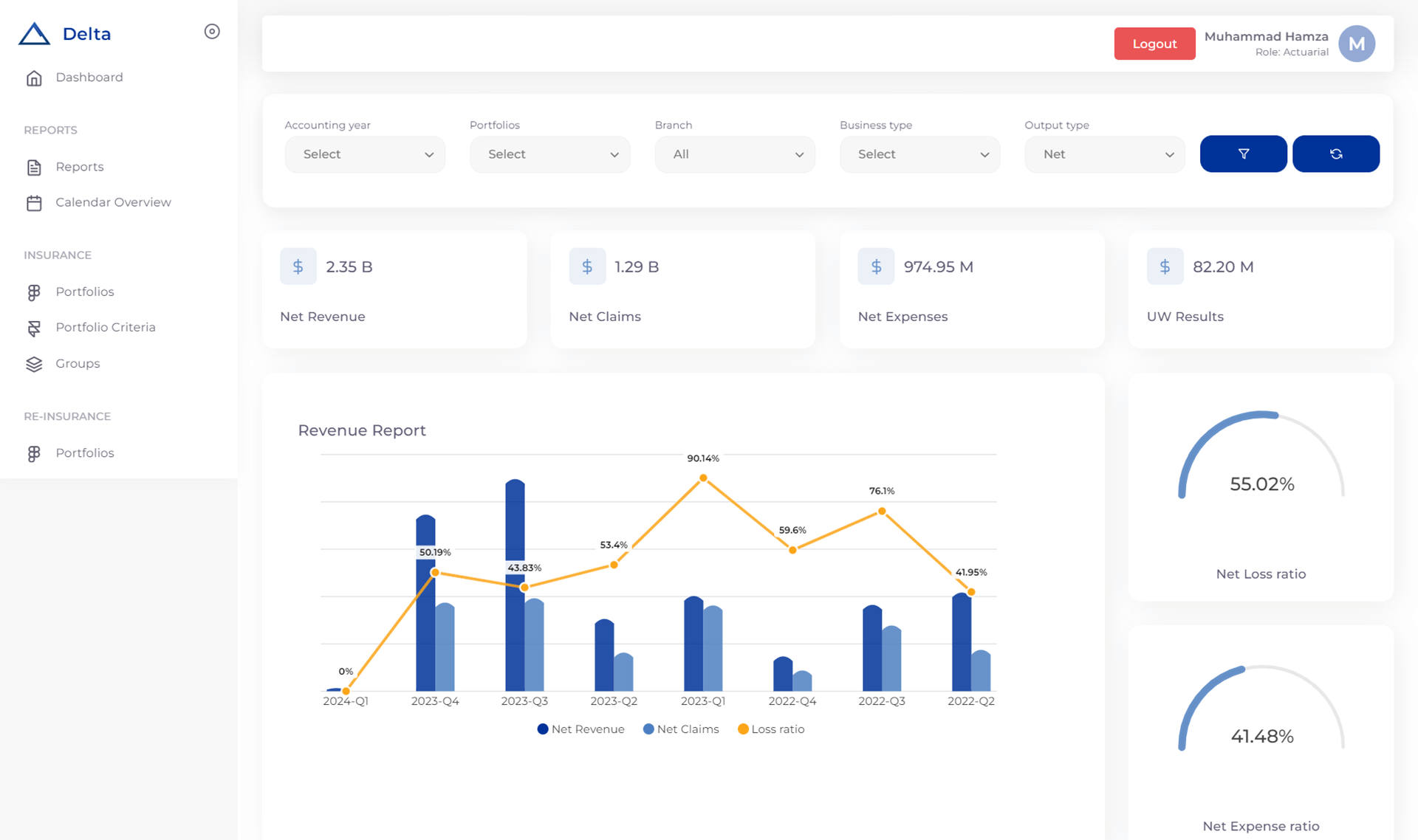
What Makes Prima Consulting’s Delta IFRS 17 Software Different
The software was built by actuaries and IFRS 17 implementation specialists who’ve worked across GCC markets, Europe, and Asia.
This means the tool addresses real-world challenges like multi-currency calculations, complex reinsurance structures, and jurisdiction-specific reporting requirements.
Delta handles all three measurement approaches seamlessly. Whether you’re applying PAA for short-duration contracts, GMM for traditional life products, or VFA for participating business, the platform adapts to your portfolio structure. You don’t need separate tools for different product lines.
Key Features of Delta IFRS 17 System
The cash flow modeling engine projects scenarios automatically, applying appropriate discount curves without manual intervention.
Risk adjustment calculations use industry-standard methodologies with built-in validation checks. CSM tracking happens at the contract group level with full audit trails showing how values change over time.
The reporting module produces regulatory disclosures in formats required by SAMA, DFSA, and other regional regulators.
You can also create custom management reports that show profitability drivers and variance analysis your executives actually need.
Integration Capabilities of Delta IFRS 17 Compliance Solution
Delta connects with your existing policy administration systems, claims platforms, and general ledgers. This eliminates double data entry and reduces reconciliation headaches.
The software pulls contract data directly from source systems, applies IFRS 17 calculations, and pushes results back to your financial reporting tools.
For organizations processing thousands of contracts across multiple jurisdictions, this automation saves weeks of manual work each quarter.
More importantly, it reduces calculation errors that can trigger audit findings or regulatory questions.
Implementation Support
Prima Consulting doesn’t just hand you software and walk away. The implementation includes data mapping workshops, assumption-setting sessions, and parallel run support.
You’ll work with consultants who’ve completed dozens of IFRS 17 implementations and understand the challenges specific to your market and product mix.
The platform includes scenario modeling capabilities that let you test “what if” questions before they become real problems. For instance, how would a 100 basis point interest rate shift affect your CSM
Similarly, what happens to LRC if claims inflation runs 5% higher than expected? Importantly, Delta answers these questions in minutes instead of days.
Moreover, if you’re moving beyond Excel-based calculations toward an enterprise-grade solution, Delta provides the functionality you need without the complexity of platforms designed for global reinsurers.
Furthermore, the software scales with your organization, whether you’re writing $50 million or $5 billion in annual premiums.

How to Create an IFRS17 Impact Calculator That Delivers Results
Quick calculation tools help you estimate the impact of business decisions and assumption changes without running full model valuations. Learn how from IFRS 17 actuarial best practices that guide your setup.
Creating an effective IFRS 17 calculator requires systematic planning, robust methodology, and continuous refinement.
Ideally, your calculator should automate complex calculations while simultaneously providing transparency into the underlying assumptions and methods.
As demonstrated above, the seven-step process provides a comprehensive framework for building a tool that not only meets regulatory requirements but also supports business decision-making.
Throughout this journey, from contract grouping through reporting output, each component systematically builds upon the previous steps to create an integrated solution.
Importantly, remember that learning how to create an IFRS17 impact calculator is an iterative process. Therefore, start with core functionality for your most significant contract groups.
Subsequently, expand to include additional features like scenario modeling and advanced analytics. Regular testing against known results and industry benchmarks helps your calculator produce reliable outputs.
The investment in building a comprehensive IFRS 17 calculator pays dividends through improved compliance, better risk management, and stronger business insights.
For insurance professionals working with this complex standard, having the right tools makes the difference between basic compliance and competitive advantage.
Your IFRS17 modeling example should serve as a foundation for ongoing refinement. As you gain experience with the calculations, you’ll identify opportunities to improve accuracy and efficiency. The key is starting with a solid framework and building upon it systematically.
Ready to transform your IFRS 17 calculator implementation process? Prima Consulting provides expert guidance and proven solutions for insurance professionals across Saudi Arabia, UAE, Pakistan, Germany, and throughout Europe.
Furthermore, our team helps you build robust calculators while maintaining full regulatory compliance and maximizing business value from your IFRS 17 vs IFRS 9 implementation efforts.